Path A · Managed service
Microsoft Cloud PKI
Microsoft runs the certificate service. Your team sets the rules in Intune.
A practical introduction · with diagrams and examples
Public key infrastructure (PKI) connects identities to cryptographic keys through digital certificates. This guide explains how certificates are issued, how services verify them, and how Microsoft Cloud PKI compares with AD CS on Azure.
Suggested learning sequence
Understand the distinct roles of a certificate, a public key and a private key.
Consider a managed laptop connecting to an organization’s Wi-Fi. The authentication service needs evidence of the laptop’s identity before it can evaluate access.
The laptop receives a digital certificate that links its identity to a public key. A certificate authority (CA) signs the certificate.
The laptop holds the matching private key. During authentication, it uses that key to create proof that the service can verify with the public key. The private key is not sent to the service. [10]
Signed by the issuer · Illustration, not a real certificate
Authentication checks identity. Authorization decides what that identity may do. Encryption hides information in transit or storage. A certificate helps a protocol establish trust; it does not encrypt every message by itself. [17][37]
What does a certificate establish, and what does the private key demonstrate?
The certificate links an identity to a public key. A valid proof created with the matching private key demonstrates possession of that key.
Trace a device certificate to an explicitly trusted root.
A root CA anchors trust. In the hierarchy shown below, it signs the issuing CA’s certificate, and the issuing CA signs the laptop’s leaf certificate. A leaf certificate belongs to an end entity, such as a device, user or service. [2]
In our certificate-based Wi-Fi example (EAP-TLS), the network’s authentication service must trust the device’s issuer chain. The device must also check the authentication server’s certificate against the intended trusted chain and server identity. Those two chains can be different. [3][18][38]
A public key can be shared, but trust in its certificate depends on the recipient’s configuration. Certificates from a private CA are not automatically trusted by web browsers. [3]
Follow the signing arrows from root to issuer to device. Then trace the certificate chain from the device back to a trusted root. Identify where trust must already be configured.
Identify which responsibilities belong to Microsoft and which remain with your organization.
Path A · Managed service
Microsoft runs the certificate service. Your team sets the rules in Intune.
Path B · Servers you operate
Azure hosts the virtual machines. Your organization operates Windows Server and AD CS.
| Question | A · Cloud PKI | B · AD CS on Azure |
|---|---|---|
| Where do I manage it? | Intune admin center. | Windows Server CA tools; Azure portal manages the VM infrastructure. |
| Primary scope in this comparison? | Certificates for supported Intune-enrolled devices and their users. | Organization-defined certificate needs, including devices, users and servers. |
| Who maintains the CA servers? | Microsoft operates the service. | Your organization operates the Windows CA servers. |
| What does my team still do? | Choose trust, permissions, profiles and access rules; monitor certificates. | Those design tasks, plus server and PKI operations. |
| Key prerequisites? | Applicable Intune and Cloud PKI licensing; supported enrolled devices. [1] | Windows Server and AD CS infrastructure; AD DS for an enterprise CA. [6][19] |
Comparison is an editorial synthesis of the cited product scopes and responsibility models. Check current licensing and workload support before choosing. [1][5][6][7][19]
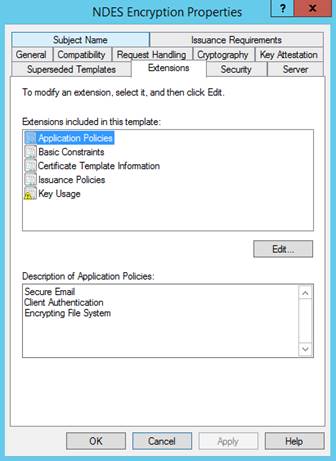
For the AD CS + Intune SCEP path, add NDES and the Intune Certificate Connector on a separate Windows server from the issuing CA. This requirement belongs to that enrollment path; it is not needed for every AD CS deployment. [8]
In which path must your team patch the Windows certificate servers?
Path B: AD CS on Azure VMs. Azure hosting does not remove responsibility for the CA software.
The A/B comparison combines Microsoft’s Cloud PKI scope [1], AD CS roles [5][6], VM hosting evidence [15] and IaaS responsibilities [19]. Auto-enrollment uses [20]. The optional Intune SCEP path uses [8][9]. BYOCA’s exchange uses [35]. This is a conceptual map, not a complete implementation diagram.
Distinguish certificate enrollment from certificate-based authentication.
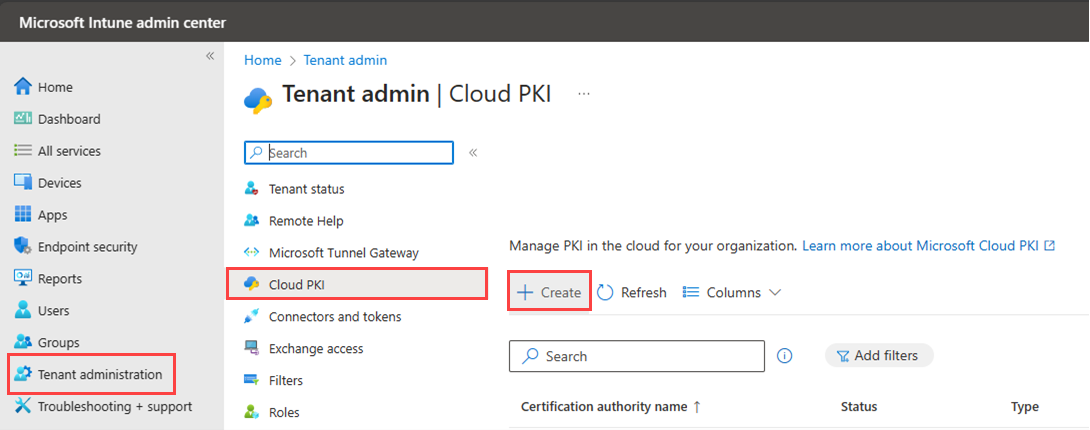
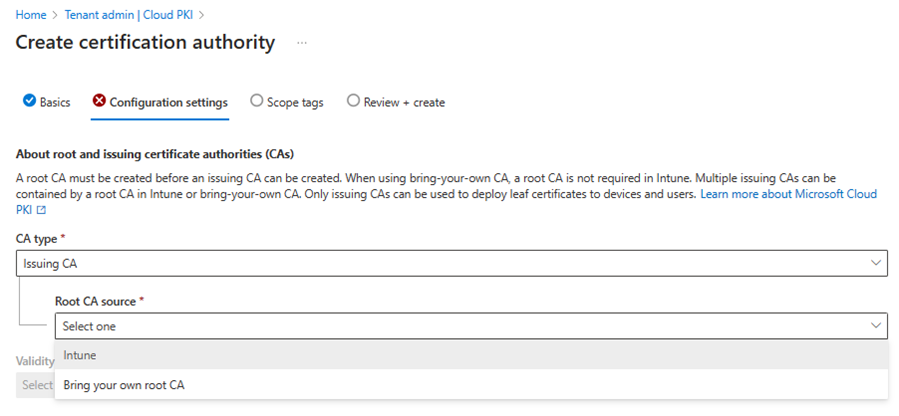
This example uses Cloud PKI + Intune. The administrator has already created the CAs and assigned the needed trust and SCEP profiles. [4]
Intune delivers the trust information and the settings needed to request a certificate.
The private key stays on the device. The certificate request contains the public key and the Intune SCEP challenge.
It checks the challenge and expected details before asking the issuing CA to sign.
The signed certificate returns to the device, which now holds both the certificate and its matching private key.
Simplified Cloud PKI enrollment flow. [1] A SCEP profile defines how a device requests its certificate. A trusted certificate profile distributes CA certificates used to establish trust. [4]
Our example uses EAP-TLS (Extensible Authentication Protocol with TLS), a certificate-based network sign-in method. The Wi-Fi equipment passes the authentication conversation to a service such as a RADIUS server. The device and the server perform the configured certificate checks. The server verifies the device’s proof of private-key possession, then applies its access rules. Receiving a certificate alone does not grant Wi-Fi access. [18][21][38]
This simplified model requires all five checks to pass. Change a condition to see why the connection would be rejected.
Conceptual model, not a production certificate validator. The five switches group many checks. Signatures, chain constraints and server validation also matter. EAP-TLS with TLS 1.3 requires revocation checking except for the trust anchor; implementation and connectivity affect how that is performed. [16][38]
A CRL is a signed list of revoked certificates. A CDP identifies a location from which to retrieve it. An AIA address can help find an issuer certificate. Maintaining access to these locations is part of PKI operations. CRLs are published and checked at intervals, so revocation information can arrive later than the revocation decision. A revocation list is not itself a command to disconnect every active session. That last distinction is an inference from the status-checking design, not a promised timing guarantee. [7][16][38]
A device has a certificate, but Wi-Fi authentication fails. Does that necessarily indicate an issuance problem?
No. Issuance may have succeeded. Trust, validity, certificate purpose, identity mapping, revocation status or access policy may still prevent the connection.
Enrollment steps paraphrase [1] Architecture A1–A5. Network sign-in combines EAP-TLS [18][38], TLS private-key proof [17] and RADIUS access policy [21]. Lifecycle concepts use [7][16]. The interactive access model groups these checks for explanation; it is not a Microsoft diagnostic tool.
Distinguish certificate issuance, identity, device management and key protection.
Select a service to open its mini-lesson. Each explains its purpose, operation, benefits and limits, with examples for Cloud PKI (Path A) and AD CS on Azure (Path B). Allow about 2-3 minutes per topic; these optional lessons are additional to the main reading time.
The scenarios and suggested alternatives are editorial applications of the cited documentation. They explain service boundaries; a production choice also depends on the workload, trust requirements and supported integrations.
A cloud service for managing devices and work apps. In this guide, its key role is to deliver certificate and trust profiles to enrolled devices. [29][4]
An administrator assigns profiles to users or devices. When a device checks in, it receives the applicable settings. In the Cloud PKI flow, the device creates its key pair and sends a certificate request to the cloud SCEP service; the issuing CA signs the approved request. [29][1]
Central assignment makes a certificate configuration repeatable across a managed fleet. The profile defines the request; the CA remains responsible for issuance. [4][1]
Cloud PKI: Intune is the management and profile-delivery layer. AD CS: it can deliver SCEP profiles to managed devices, with NDES and the Intune Certificate Connector connecting that enrollment path to AD CS. [4][8]
Example: domain-joined Windows computers already use certificate auto-enrollment. AD CS with Group Policy may cover that enrollment need without adding Intune solely for certificates. Example: a device has its certificate but Wi-Fi rejects it. Check the network authentication service, trust and access policy; an Intune profile does not replace those checks. [20][21]
Follow the process: Enrollment and authentication. Microsoft documentation: Intune overview.
Microsoft’s cloud identity and access management service. It manages identities and authentication for connected applications. Certificate-based authentication (CBA) is one of its sign-in capabilities. [43][13]
For CBA, an administrator configures trusted CAs, enables the method for selected users, and defines how certificate fields map to user accounts and authentication requirements. Entra ID then evaluates certificate-based sign-in under that configuration. [14]
It gives applications a shared identity service. Where user certificates are appropriate, CBA supports direct certificate sign-in to Entra ID without requiring a federated AD FS service for that purpose. [43][13]
Cloud PKI and AD CS: either architecture still needs a separate plan for user sign-in. For an application that supports Entra CBA, evaluate the user certificate, trusted chain, account mapping and policy against the CBA requirements. A device Wi-Fi certificate is not automatically a suitable user sign-in certificate. [13][14]
Example: you need to issue certificates. Entra CBA does not provide that PKI; use the appropriate CA service. Example: the Wi-Fi system expects RADIUS/EAP-TLS. Use a compatible network authentication service, such as NPS where appropriate. Enabling Entra CBA alone does not configure that network sign-in path. [13][21]
Compare roles: Cloud PKI and AD CS. Microsoft documentation: Configure Entra CBA.
Active Directory Domain Services is the Windows Server directory service. It holds user and computer accounts and other network information, and supports domain authentication and access control. [44]
Domain controllers store and replicate directory information. An enterprise AD CS CA uses AD DS accounts, groups and certificate templates when processing certificate requests. AD DS supplies directory context; the CA signs the certificate. [44][6]
It connects certificate enrollment to an existing Windows domain. Enterprise CA integration supports automated enrollment, reducing the need to handle each request manually. [6][20]
AD CS: useful when the design depends on enterprise CAs, domain identities, templates and Group Policy auto-enrollment. Cloud PKI: your organization may retain AD DS for other workloads, but the managed Cloud PKI issuance flow does not require you to deploy a new Windows domain. [6][20][1]
Example: an Intune-managed fleet only needs Cloud PKI enrollment. Do not add a domain solely to imitate an AD CS design; use the documented Intune and Cloud PKI profiles. Example: an offline root CA should operate without AD DS. AD CS supports a standalone CA, which does not use enterprise certificate templates. Entra ID and AD DS are distinct services, not interchangeable names. [1][6][36]
Trace the trust: Root and issuing CAs. Microsoft documentation: AD DS overview.
An Azure VM is a virtual computer running in Microsoft’s infrastructure. You choose its operating system and resources; Microsoft supplies the underlying physical infrastructure. [40][19]
For AD CS, you install and configure Windows Server and the CA role on the VM. The VM supplies compute, disks and network connectivity. The certificate service remains software your organization operates. [40][5][15]
VMs offer control over the server environment while avoiding ownership of the physical hardware. This can suit existing Windows Server workloads that need that control. [40]
AD CS: an issuing CA can run on an Azure VM when your design needs Windows certificate services. The Intune SCEP path also needs its documented NDES/connector infrastructure. Your team remains responsible for the operating system, CA configuration and operational protection. [15][8][19]
Example: you want Microsoft to operate certificate issuance for supported Intune devices. Evaluate Cloud PKI; it does not require customer-run CA VMs. Example: you only need to store an application certificate. Evaluate Key Vault rather than creating a Windows CA solely for storage. Hosting a CA in Azure does not make it a managed PKI service. [1][11][19]
Compare responsibilities: The two deployment models. Microsoft documentation: Azure VM overview.
A service for managing keys, secrets and certificates. Its certificate capability helps applications store and manage certificate versions and lifecycle settings. [11][45]
A Key Vault certificate has related key and secret objects. You can import a certificate or create one using a policy and an issuer workflow. Private-key retrieval depends on exportability; permission to read certificate metadata is distinct from access to the key or secret. [11][22]
It provides controlled access and lifecycle management for application certificates. Automatic renewal is available with supported partner issuers; it is not a guarantee for every imported or externally issued certificate. [11]
Example: an application needs an HTTPS certificate. Key Vault can manage that certificate alongside either PKI architecture. The application or hosting service still needs a supported way to use it. The issuer and client trust requirements remain separate decisions. [11][3]
Example: a fleet needs Wi-Fi certificates enrolled through Intune. Use Cloud PKI or the supported AD CS enrollment path; storing a certificate in Key Vault does not implement those flows. Example: a service needs to download a private key. A non-exportable key will not meet that requirement; select a compatible certificate policy or a design that can use remote key operations. [1][8][22]
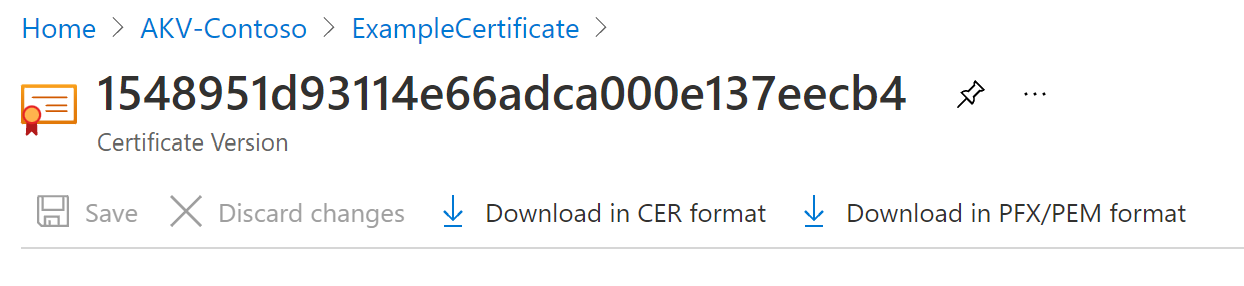
See the interface: the Key Vault screenshot below shows public-certificate download. Microsoft documentation: Key Vault certificates.
A hardware security module (HSM) is specialized hardware for protecting cryptographic keys and performing operations with them. HSM is a category of technology; Azure offers several services that use it. [6][45]
A CA or application sends a supported cryptographic operation to the HSM through an integration interface. The HSM performs the operation using the protected key. Key custody and supported interfaces depend on the product. [6][45]
It can separate key protection from the server operating system. This matters especially for CA signing keys, where compromise can affect trust in many issued certificates. [6]
Cloud PKI: licensed CAs use Managed HSM-backed keys as part of the service; you do not need a separate Azure subscription for that capability. Trial-created CA keys remain software-backed after licensing. AD CS: evaluate a compatible HSM when the key-protection requirements justify it. Azure Cloud HSM is one documented option for AD CS on Azure VMs. [1][15]
Example: you need certificate enrollment or Wi-Fi authorization. An HSM alone supplies neither; use a CA/enrollment service and a compatible authentication service. Example: you need a certificate store with lifecycle policies. Evaluate Key Vault certificates. Managed HSM is a key-management service, not a replacement for that certificate workflow. [42][45][11][21]
Choose by integration: Azure Key Vault, Managed HSM and Azure Cloud HSM have different roles and interfaces. Compare Azure key-management services. [45]
A public website usually needs a certificate from an issuer browsers already trust. Key Vault may help manage that certificate, and a web service presents it. Cloud PKI’s Intune device-enrollment path is a different workflow. [3][11][1]
Who stores application certificates? Who assigns device profiles? Who signs the device’s certificate?
Key Vault can store application certificates. Intune assigns device profiles. The issuing CA signs the device’s certificate.
Intune management uses [4][29]; Entra CBA scope and bindings [13][14]; AD DS differences [6][36]; VM responsibility [15][19]; Key Vault management/export [11][22]; Cloud PKI licensed/trial key differences [1]. Product comparisons and the mini-lesson scenarios are a synthesis of those scopes. The expanded lessons also use the Managed HSM overview [42], Entra product-family definition [43], AD DS overview [44] and Azure key-management comparison [45].
Open source entries: [1][4][6][11][13][14][15][19][22][29][36]
Compare operating models and explain how the components work together.
“We mainly need certificates on devices managed by Intune. We want Microsoft to operate the issuing service.”
Cloud PKI. Confirm device support, relying-party compatibility and licensing. You still configure trust and access policies.
“We already use Windows domains, certificate templates and several server certificate workflows. We can run Windows PKI infrastructure.”
AD CS on Azure VMs may fit those needs. For Intune enrollment, compare its connector path with adding a Cloud PKI BYOCA issuer.
These fictional scenarios and suggested directions are editorial applications of the two product scopes, not vendor recommendations or a deployment decision. Existing trust and relying-party requirements can change the choice. [1][3][5][19]
No. The certificate contains the public key. A PFX/PKCS #12 bundle can separately package a certificate with a private key; the certificate and the bundle are different things. [16][23]
No. The root anchors trust. The network authentication service checks the connection and applies access policy. [2][21]
No. Your team still runs AD CS. Microsoft Cloud PKI is a separate managed service. [1][19]
Sketch the root CA, issuing CA, device, Intune and authentication service. Label three distinct relationships: certificate signing, profile delivery and authentication. Use the diagram to explain why issuing a certificate and granting access are separate operations.
The organization scenarios, review questions and summary are original explanatory material. Answers reuse the sourced concepts in lessons 1-5. PFX contents follow [23]; network access policy [21]; cloud-versus-customer operation [1][19]. The suggested path to explore is editorial reasoning, not an external recommendation.
Acronyms, product names and concepts used in Azure, PKI and mobile identity documentation. A means Cloud PKI; B means AD CS. Some belong to the wider certificate ecosystem, not every deployment.
83 terms
The former name of Microsoft Entra ID. Older diagrams and scripts may still use AAD or Azure AD; Windows Server AD DS is a different directory service.
A protocol that automates verification and certificate issuance between a client and a CA. It is one of the enrollment options supported by EJBCA.
Windows Server’s certificate service, operated by your organization.
The Windows domain directory used by enterprise CAs. Different from Entra ID.
Certificate information that can help a service locate the issuer’s certificate.
Shorthand for Azure Key Vault, a service for managing secrets, cryptographic keys and certificates. Storing a certificate in a vault is a different job from operating the CA that issued it.
Azure’s deployment and management layer. It processes requests to create, change and remove Azure resources, such as the VMs used to host AD CS.
Connect a Cloud PKI issuing CA to your existing private CA hierarchy.
Importing an externally created key into an Azure key-management service. It concerns key custody; BYOCA concerns how a Cloud PKI issuing CA connects to an existing CA hierarchy.
The authority that issues and signs certificates. Here CA does not mean Conditional Access.
Proving identity with a certificate and its matching private key.
A location from which a service can retrieve a certificate revocation list.
the public-certificate download option shown in the Key Vault capture.
A key whose lifecycle your organization controls. Supported Azure services can use it to protect data. A CMK is a cryptographic key, not automatically a certificate or CA.
A protocol for obtaining and managing X.509 certificates. EJBCA supports it; the client and CA must support a compatible enrollment method.
Policies that use signals such as the user, device and location to decide whether access is allowed and what checks are required. Some discussions shorten it to CA; in this lesson, CA means certificate authority.
The rules for a PKI: who certificates are for, which uses they support and what requirements participants must meet. A policy helps a relying party judge whether to trust a certificate for a particular purpose.
The description of how a CA operates and meets its certificate policies, including issuance, renewal and revocation. CP states the requirements; CPS explains how the organization implements them.
A signed list of certificates revoked before they expire.
An application for a certificate containing the public key and requested identity information.
The signing role that uses a private key to sign mobile-document security data. The corresponding public key is carried in a Document Signer certificate. This is a signing role below the IACA, rather than the root trust anchor.
The IACA-signed certificate for a document-signing public key. GOV.UK uses “Document Signing Certificate.” Signing keys rotate regularly; retain the public certificate while documents signed with that key still need verification.
A network sign-in method that uses TLS and certificates. This is the method in the Wi-Fi example in this guide.
A PKI platform with certificate-authority, registration-authority and validation-authority functions. EJBCA Cloud can run in Azure, with configuration and maintenance controlled by the customer. It is a separate product from Microsoft Cloud PKI and AD CS.
A certificate’s permitted use, such as client authentication.
A standardized protocol for certificate enrollment and management over a protected connection. EJBCA supports EST alongside other enrollment protocols; an EST client needs an EST-capable service.
A bundle of Windows domain rules; it can configure certificate auto-enrollment.
A protected cryptographic device that guards keys and performs operations with them.
Web communication protected with TLS.
Renting computing infrastructure; your team still manages the software inside its VMs.
The issuing authority’s top-level CA in the mobile-document model. Its root certificate is the trust anchor used to verify Document Signer certificates. Here IACA refers to mobile identity, rather than an Azure service or an intermediate CA.
Microsoft’s web server software; it hosts the NDES web endpoint.
A CA between the trusted root and the final certificate in a chain. Its own certificate is signed by another CA. A certificate below a root is not necessarily a CA certificate: a document signer can be an end entity.
The CA that issues certificates to users, devices or services. This describes its role in the hierarchy; the lesson’s two-tier examples place it beneath a root CA.
A key used to encrypt other keys. This lets a system protect access to those keys without using the KEK to encrypt every piece of application data directly.
an end-user, device or service certificate, not a CA certificate.
An identity for a workload whose credentials Azure manages. The workload can authenticate to services that support Microsoft Entra authentication without your application storing a password or managing its own authentication certificate.
Managing enrolled devices, including computers, using rules and profiles.
A digital credential in the mobile-document format discussed here. Its signed security data and certificate chain let a verifier check its issuer and integrity. IACA and document-signing terminology belong to this context.
Authentication using more than one kind of evidence: something you know, possess or are. Two passwords are still the same kind of factor. Entra policies can require MFA for access.
Shorthand for Microsoft’s managed, single-tenant HSM service for cryptographic keys. It protects keys and performs cryptographic operations; the certificate-authority software performs certificate issuance.
Signed security data used to verify a mobile document’s issuer and integrity. The verifier uses the document-signing public key and validates its certificate back to the IACA trust anchor.
TLS with certificate authentication on both sides: the server proves its identity to the client, and the client proves its identity to the server. Each side still needs appropriate trust and validation rules.
The AD CS role that handles certificate enrollment through SCEP.
Microsoft’s RADIUS server: it can check network sign-ins and access rules.
Azure rules that allow or deny network traffic to and from resources in a virtual network. Useful around PKI servers, but traffic filtering and certificate validation solve different problems.
Asking a status responder about a certificate instead of downloading a whole CRL. Support varies.
A unique dotted-number label for something, such as an allowed certificate purpose.
A cloud model in which the provider manages the underlying platform while the customer manages its applications, data and applicable access settings. Responsibility varies by service.
A text wrapping format now commonly used for certificates or keys. Check what is inside.
A certificate bundle that can include a private key; commonly uses PKCS #12.
An Entra service for managing privileged access, including time-limited and approval-based role activation. It can reduce how long elevated permissions remain active.
A family of formats and methods; the number identifies which one.
The system of keys, certificates, authorities, trust policies and lifecycle management.
A network interface with a private IP address that connects a virtual network to a supported service through Azure Private Link. It provides private connectivity; the service’s authentication and authorization requirements still apply.
settings Intune delivers to a device.
A role that validates an enrollment request before the CA issues a certificate.
A protocol network equipment uses to ask a central service about access.
Giving administrators permissions according to their jobs.
whoever checks and relies on the certificate.
A logical container for related Azure resources that you want to manage together. For example, a deployment could group its PKI VMs and networking resources. A resource group belongs to a subscription.
The top-level CA in a certificate hierarchy. Its certificate must be deliberately trusted; being self-signed does not make it trustworthy. In the mobile-document example, the IACA supplies this trust anchor.
A public-key algorithm used for key establishment and digital signatures.
A provider-operated application delivered as a service. The customer still manages responsibilities such as its data, identities and access settings; using SaaS does not transfer every security responsibility.
Extra identities in a certificate, such as a DNS name or user identity.
A way for a device to request and receive a certificate.
The local representation of an application or workload identity in a tenant. Permissions are granted to this identity so software can access resources. A managed identity uses a special type of service principal.
Makes a compact fingerprint of data; used as part of many signature schemes.
A container for Azure resources that also supports billing and access management. A subscription trusts one Microsoft Entra tenant; one tenant can be associated with several subscriptions.
an enterprise AD CS configuration defining certificate contents and enrollment permissions.
here, your organization’s dedicated Microsoft Entra instance.
The protocol that protects many connections and uses certificates to help verify identity.
A security component that can generate, store and restrict use of keys. Key protection depends on device configuration.
the approved list of trusted CA certificates.
A user sign-in name, often shaped like [email protected].
A service that supplies certificate-status information, for example through OCSP or CRLs. EJBCA can provide this role. Status information is one input to validation; it does not by itself grant access.
A network with an address space in Azure where resources such as VMs communicate. In an AD CS deployment it provides networking for the servers; NSGs can filter traffic within or across its subnets.
A protected connection to another network; certificates can help authenticate it.
the standard certificate structure used here; not an acronym.
Definitions are concise explanations; the references provide the full technical context. Related technical references: [2][5][6][8][9][10][11][14]
Sources and supporting documentation
Sources accessed and factual wording reviewed October 16, 2026. Screen captures are embedded copies from Microsoft Learn, not captures of your tenant. They may show older interface styling or example settings. The diagrams, device scenario and exercises are original explanatory material.
Images appear beside their explanations with source links. Microsoft owns the depicted interfaces. This is an independent learning guide, not a Microsoft publication. Links need internet access; the portable HTML edition and its pictures do not.
Each entry explains what it supports and where to find the supporting text. All links below were retrieved successfully during this review. Source numbers also appear beside claims and dictionary definitions.
The four embedded captures are unchanged image files from the cited Microsoft documentation. The checksums identify the exact embedded bytes, not the age of the interface shown.
0cb47ee257c53579f3d6ae166409af0a7ba2060cf4b0da9bf3fcecd3dd68821ba98b2b188ca23cb71103203bd2fcb569a91934636594d42fbdd0fbd52260e505c110363559f87a06f98255b9115df140622972dc1a1a4860aadbc8a8554455b3c9d460a06bf6f907d2a449d0bdc58f0c447b2c4b7de263349d666f470f55f9cdEditorial reading order; the bracketed numbers above link to the same source register. This guide makes no claim that one architecture suits every organization.